
SWITCH 10/100 À 16 PORTS #F5D5131EA16 - Network switch BELKIN - Free user manual and instructions
Find the device manual for free SWITCH 10/100 À 16 PORTS #F5D5131EA16 BELKIN in PDF.


| Product type | 16-port 10/100 network switch |
| Brand | BELKIN |
| Model | F5D5131-16 (16-PORT 10/100 SWITCH #F5D5131EA16) |
| Dimensions | 274 x 166 x 43 mm |
| Power supply | 100-240 VAC, 50-60 Hz (universal) |
| Number of ports | 16 RJ-45 10/100 Mbps ports |
| Auto-negotiation | Yes, speed and duplex (10/100 Mbps, half/full duplex) |
| Auto MDI/MDIX | Yes, on all ports |
| Flow control | IEEE 802.3x full duplex, back pressure half duplex |
| MAC address table size | Up to 2000 addresses |
| Supported standards | IEEE 802.3 10Base-T, IEEE 802.3u 100Base-Tx |
| Enclosure | Metal, 1U form factor, desktop or 19" rack mountable |
| LED indicators | Power, Link/Act, Speed (10/100), Duplex/Collision (FDX/COL) |
| Operating temperature | 0°C to 40°C (standard estimate) |
| Operating humidity | 10% to 90% non-condensing (standard estimate) |
| Package contents | Switch, AC power cord, 19" rack mount kit, 4 adhesive rubber feet, user manual |
| Recommended cable | Category 5 or higher |
| Warranty | Belkin limited lifetime warranty |
| Care and cleaning | Unplug before cleaning. Use a soft, dry cloth. Do not use liquids or aerosols. |
| Installation | Flat surface (with rubber feet) or 19" rack (with mounting kit). Ensure adequate ventilation. |
| OS compatibility | All major operating systems |
Frequently Asked Questions - SWITCH 10/100 À 16 PORTS #F5D5131EA16 BELKIN
User questions about SWITCH 10/100 À 16 PORTS #F5D5131EA16 BELKIN
0 question about this device. Answer the ones you know or ask your own.
Ask a new question about this device
Download the instructions for your Network switch in PDF format for free! Find your manual SWITCH 10/100 À 16 PORTS #F5D5131EA16 - BELKIN and take your electronic device back in hand. On this page are published all the documents necessary for the use of your device. SWITCH 10/100 À 16 PORTS #F5D5131EA16 by BELKIN.
USER MANUAL SWITCH 10/100 À 16 PORTS #F5D5131EA16 BELKIN
16-Port 10/100 Switch dot 24-Port 10/100 Switch
Increase your network's port count
Switch 10/100 16 Ports • Switch 10/100 24 Ports
Increase your network's port count
Switch 10/100a 16Porte • Switch 10/100a 24Porte
Increase your network's port count


TABLE OF CONTENTS
Introduction
Features 1
Package Contents 1
Cabling Distances 1
Recommended Cabling Standard 1
Physical Dimensions 1
Getting to Know your Switch
Front Panel LEDs 2
Connecting Networking Devices to your Switch
Connecting your Switch to your Computers 4
Connecting your Switch to another Switch 4
Placement of the Switch
Placement on a Flat Surface 5
Placement in a 19-Inch Rack 5
Troubleshooting 6
Information 7
Congratulations on your purchase of this high-quality Belkin networking product. Belkin 16- and 24-Port 10/100 Switches allow you to easily add port density to your existing 10/100 network.
Engineered for compact convenience, each Switch features a durable metal chassis that can be placed on the desktop, mounted on a wall, or with the included rack-mount kit, integrated into a 19-inch rack. All ports auto-negotiate between a 10/100Mbps network and adjust for straight-through or crossover cables—you don't have to worry about cable type.
Compatible with existing major operating systems, your 16- or 24-Port 10/100 Switch from Belkin delivers error-free transfers at Fast Ethernet network speeds.
Features
- High-speed, dedicated 10/100Mbps Ethernet ports
- 16 ports (Belkin 16-Port 10/100 Switch F5D5131-16)
- 24 ports (Belkin 24-Port 10/100 Switch F5D5131-24)
- Standards
- IEEE 802.3u 100Base-Tx
- IEEE 802.3 10Base-T
- 1U chassis, place on your desk, or 19-inch rack
- Internal power supply (100-240VAC/50-60Hz universal input)
- Auto MDI/MDIX ports
- Auto-negotiation between 10 and 100Mbps on all ports
- Auto-negotiation for full and half duplex on all ports
- Collision detection on all ports
- IEEE 802.3x PAUSE frames flow control in full-duplex operation
- Back-pressure flow control in half-duplex operation
- Support for up to 2,000 MAC address entries (F5D5131-16), or 4,000 MAC address entries (F5D5131-24)
- A Belkin Limited Lifetime Warranty and free, 24-hour technical support
Package Contents
- Belkin 16-Port 10/100 Switch or 24-Port 10/100 Switch
- AC power cord
Kit for 19-inch rack installation - Four self-adhesive rubber pads for desktop
- User Manual
Cabling Distances
- 100m (328 ft.)
Recommended Cabling Standard
Category 5
Physical Dimensions
16-Port 10/100 Switch - 10.8 x 6.5 x 1.7 in. (274 x 166 x 43mm)
24-Port 10/100 Switch - 17.3 x 6.77 x 1.7 in. (440 x 172 x 43mm)
Front Panel LEDs
The F5D5131-16 has three rows of LEDs that provide information about connection activity, speed, and duplex mode.
16-Port 10/100 Switch (F5D5131-16)
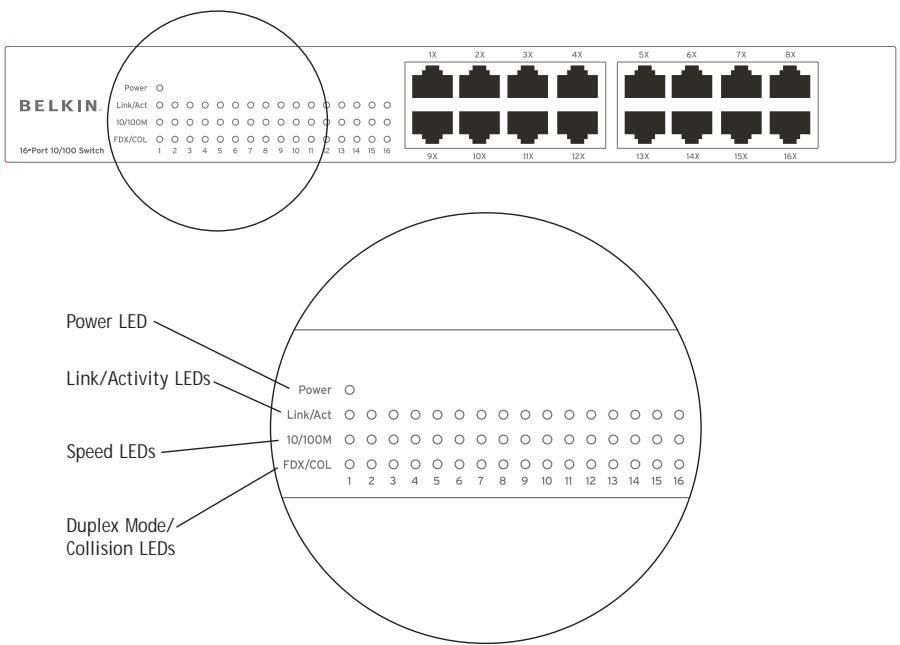
Power LED
- Green - Switch is operating normally
- Off - There is no power to the Switch
Link and Activity (Link/Act) LED
Solid Green - A valid link has been established
- Blinking Green - Data is being transmitted and received
- Off - No link is established
Speed (10/100M) LED
Solid Green - 100Mbps operation
- Off - 10Mbps operation
Duplex Mode/Collision (FDX/COL) LED
Solid Green - A full-duplex link is established on the port
- Off - A half-duplex link is established on the port
- Blinking Green - Collisions are occurring on the port when operating in the half-duplex mode
Front Panel LEDs
The F5D5131-24 has two rows of LEDs that provide information about connection activity, speed, and duplex mode.
24-Port 10/100 Switch (F5D5131-24)
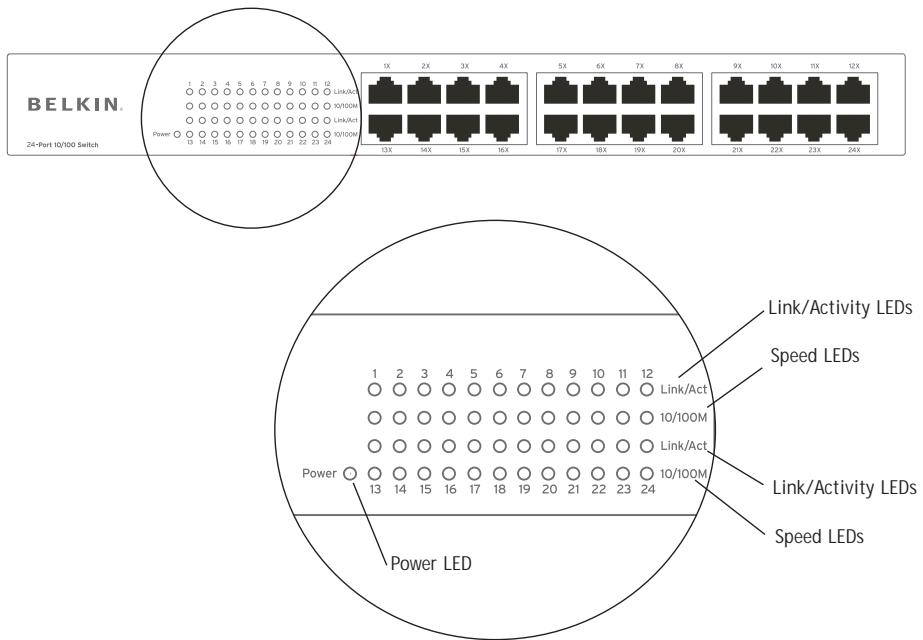
Power LED
- Green - Switch is operating normally
- Off - There is no power to the Switch
Link and Activity (Link/Act) LED
Solid Green - A valid link has been established
- Blinking Green - Data is being transmitted and received
- Off - No link is established
Speed (10/100M) LED
Solid Green - 100Mbps operation
- Off - 10Mbps operation
Connecting your Switch to your Computers
- Power down all your equipment.
- Connect an Ethernet cable between each computer's network interface card and one of the numbered ports on the front of the Switch.
- All switch ports can automatically negotiate speeds and full- and half-duplex modes to allow users to attach 10/100Base-Tx network devices.
- Connect the power adapter cord into the power adapter socket in the rear of the Switch; now plug the adapter cord into a power source (wall jack or power strip).
Connecting your Switch to another Switch
- Connect a 10/100 Ethernet cable between one of the numbered ports on the front of the Switch and one of the numbered ports on the other Switch you are cascading or connecting to.
- All switch ports can automatically negotiate speeds and full- and half-duplex modes to allow users to attach 10/100Base-Tx network switches or hubs.
- All ports support auto MDI and MDIX functionality. When cascading or connecting switches or hubs, the user can use a straight-through or crossover cable.
Important: When connecting two switches together, use a single cable. If multiple cables are used, loops may occur resulting in unwanted collisions. This will result in poor network performance.
The Switches can be placed on a flat surface, on a wall, or in a 19-inch rack.
Placement on a Flat Surface
- Affix the four rubber feet shipped with the Switch on the bottom of the Switch in the area that is clearly marked on each of the four corners.
- Make sure the Switch is placed in an area that allows for proper ventilation.
- Place on a flat surface.
Placement in a 19-Inch Rack
- Do not affix the four rubber feet on the Switch when rack-mounting. If already affixed, remove.
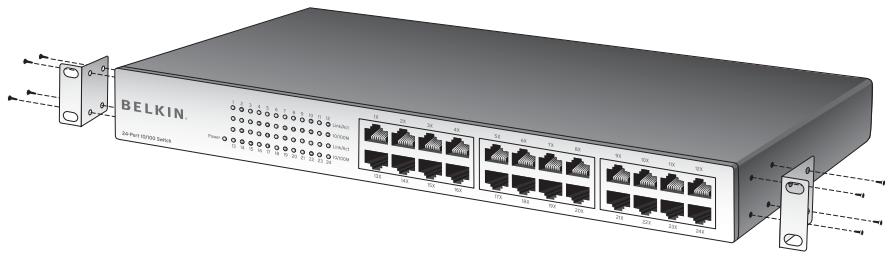
- Attach the mounting bracket to each side of the Switch with the included screws.
- Place the Switch in the rack and align the holes of the mounting bracket with the correct hole in the rack.
- Place and tighten the screws of each mounting bracket into the rack.
TROUBLESHOOTING
For further information regarding the installation of this product, please visit www.belkin.com/networking or call our toll-free technical support number.
Before you Call
If possible, turn on your system before you call Belkin for technical assistance and call from a telephone at or near the switch. You may be asked to describe detailed information during operation.
FCC Statement
DECLARATION OF CONFORMITY WITH FCC RULES FOR ELECTROMAGNETIC COMPATIBILITY
We, Belkin Corporation, of 501 West Walnut Street, Compton, CA 90220, declare under our sole responsibility that the products,
F5D5131-16
F5D5131-24
to which this declaration relates,
comply with Part 15 of the FCC Rules. Operation is subject to the following two conditions: (1) this device may not cause harmful interference, and (2) this device must accept any interference received, including interference that may cause undesired operation.
CE Declaration of Conformity
We, Belkin Corporation, declare under our sole responsibility that the products F5D5131-16 and F5D5131-24, to which this declaration relates, are in conformity with Emissions Standard EN55022 and Immunity Standard EN55024, and LVD EN61000-3-2 and EN61000-3-3.
ICES (F5D5131-16)
Belkin Corporation Limited Lifetime Product Warranty
Belkin Corporation warrants this product against defects in materials and workmanship for its lifetime. If a defect is discovered, Belkin will, at its option, repair or replace the product at no charge provided it is returned during the warranty period, with transportation charges prepaid, to the authorized Belkin dealer from whom you purchased the product. Proof of purchase may be required.
This warranty does not apply if the product has been damaged by accident, abuse, misuse, or misapplication; if the product has been modified without the written permission of Belkin; or if any Belkin serial number has been removed or defaced.
THE WARRANTY AND REMEDIES SET FORTH ABOVE ARE EXCLUSIVE IN LIEU OF ALL OTHERS, WHETHER ORAL OR WRITTEN, EXPIRESSED OR IMPLIED. BELKIN SPECIFICALLY DISCLAIMS ANY AND ALL IMPLIED WARRANTYES, INCLUDING, WITHOUT LIMITATION, WARRANTYES OF MERCHANTABILITY AND FITNESS FOR A PARTICULAR PURPOSE.
No Belkin dealer, agent, or employee is authorized to make any modification, extension, or addition to this warranty.
BELKIN IS NOT RESPONSIBLE FOR SPECIAL, INCIDENTAL, OR CONSEQUENTIAL DAMAGES RESULTING FROM ANY BREACH OF WARRANTY, OR UNDER ANY OTHER LEGAL THEORY, INCLUDING BUT NOT LIMITED TO, LOST PROFITS, DOWNTIME, GOODWILL, DAMAGE TO OR REPROGRAMMING OR REPRODUCING ANY PROGRAM OR DATA STORED IN, OR USED WITH, BELKIN PRODUCTS.
Some states do not allow the exclusion or limitation of incidental or consequential damages or exclusions of implied warranties, so the above limitations of exclusions may not apply to you. This warranty gives you specific legal rights, and you may also have other rights that vary from state to state.
BELKIN
belkin.com
Belkin Corporation
501 West Walnut Street
Compton dot CA dot 90220 dot USA
Tel: 310.898.1100
Fax: 310.898.1111
Belkin Ltd.
Express Business Park • Shipton Way • Rushden
NN10 6GL • United Kingdom
Tel: +44 (0) 1933 35 2000
Fax: +44 (0) 1933 31 2000
Belkin B.V.
Starparc Building • Boeing Avenue 333
1119 PH Schiphol-Rijk dot The Netherlands
Tel: +31 (0) 20 654 7300
Fax: +31 (0) 20 654 7349
Belkin GmbH
Hanebergstrasse 2
80637 Munich dot Germany
Tel: +49 (0) 89 143405 0
Fax: +49 (0) 89 143405 100
Belkin SAS
Switch 10/100 16 Ports Switch 10/100 24 Ports
501 West Walnut Street
Assistance technique Belkin
Europe: 00 800 223 55 460
501 West Walnut Street
Compton dot CA dot 90220 dot USA
Tel: 310.898.1100
Fax: 310.898.1111
Belkin Ltd.
Express Business Park • Shipton Way • Rushden
501 West Walnut Street
Compton dot CA dot 90220 dot USA
Tel: 310.898.1100
Fax: 310.898.1111
Belkin Ltd.
Express Business Park • Shipton Way • Rushden
501 West Walnut Street
Compton dot CA dot 90220-5221 dot EE.UU.
Tel: 310.898.1100
Fax: 310.898.1111
Belkin Ltd.
Express Business Park • Shipton Way • Rushden
501 West Walnut Street
Compton dot CA dot 90220 dot USA
Tel: 310.898.1100
Fax: 310.898.1111
Belkin Ltd.
Express Business Park • Shipton Way • Rushden
NN10 6GL dot Regno Unito
Tel: +44 (0) 1933 35 2000
Fax: +44 (0) 1933 31 2000
Belkin B.V.
Starparc Building dot Boeing Avenue 333
1119 PH Schiphol-Rijk dot Paesi Bassi
Tel: +31 (0) 20 654 7300
Fax: +31 (0) 20 654 7349
Belkin GmbH
Hanebergstrasse 2


- TABLE OF CONTENTS
- Introduction
- Getting to Know your Switch
- Connecting Networking Devices to your Switch
- Placement of the Switch
- Troubleshooting 6
- Information 7
- Features
- Package Contents
- Cabling Distances
- Recommended Cabling Standard
- Physical Dimensions
- Front Panel LEDs
- 16-Port 10/100 Switch (F5D5131-16)
- Power LED
- Link and Activity (Link/Act) LED
- Speed (10/100M) LED
- Duplex Mode/Collision (FDX/COL) LED
- 24-Port 10/100 Switch (F5D5131-24)
- Connecting your Switch to your Computers
- Connecting your Switch to another Switch
- Placement on a Flat Surface
- Placement in a 19-Inch Rack
- TROUBLESHOOTING
- Before you Call
- FCC Statement
- DECLARATION OF CONFORMITY WITH FCC RULES FOR ELECTROMAGNETIC COMPATIBILITY
- CE Declaration of Conformity
- ICES (F5D5131-16)
- Belkin Corporation Limited Lifetime Product Warranty
- BELKIN
- Belkin Corporation
- Belkin Ltd.
- Belkin B.V.
- Belkin GmbH
- Belkin SAS
- Switch 10/100 16 Ports Switch 10/100 24 Ports
- Assistance technique Belkin
Brand : BELKIN
Model : SWITCH 10/100 À 16 PORTS #F5D5131EA16
Category : Network switch